Your suppliers signed. We hold them to it.
Supplier contract software, built in healthcare.
Rebates collected. Implants billed right. Vendors in compliance. Everything with the evidence behind it.
Losing rebate money your suppliers promised?
Rebate Recovery
Every rebate held as written and checked against every purchase. For hospitals, and for any buyer with supplier rebate agreements.
Paying above contract on implants?
Implant Control
The implant you used, at the price you agreed, checked against the surgical case before the purchase order.
Also from Techinquest
- Vendor ComplianceVaccination and document compliance for vendor representatives
- Delivery TrackingInternal courier requests, driver dispatch and package tracking between facilities
- Product ApprovalPhysician sign-off for surgical product requests
- Forms LibraryOne catalog for every hospital form, its print orders, artwork and translations
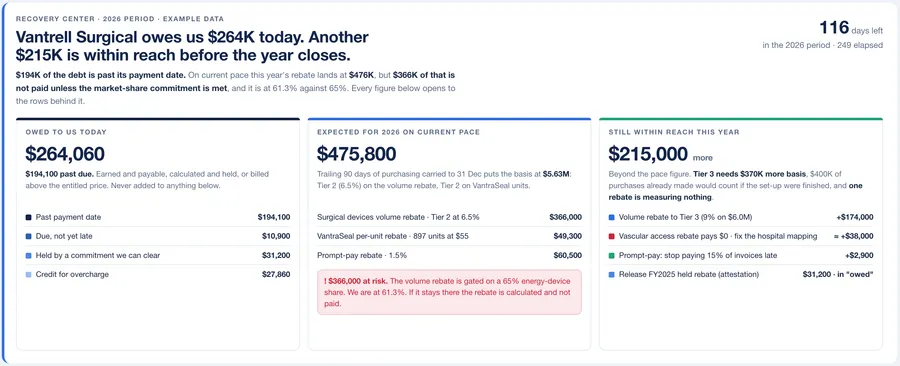
Two places the money goes missing, and how the two products close them
Rebates you earned and never collected, and implants billed above contract. One is collection after the spend, the other is control at the point of spend, and each runs as a loop.
The agreement is read
AI proposes, a person approves
Purchase files load
invoices, POs, receipts, tracing
The engine runs
tiers, shares, commitments
The statement
earned, received, owed, by reason
Alerts, ranked by money
overdue, short, still in reach
Payment reconciled
remittance checked, split, booked
Clean, contract-priced implant spend is what the rebate contracts are claimed against.
The surgery
the case record arrives from the EMR
The rep files once
against the real case, online
Three checks
price, case, policy
Approver works the differences
only the lines that differ
Requisition to the ERP
the PO number comes back
Clean spend for rebates
what Rebate Recovery claims against
The implant spend that Implant Control cleans up is exactly where the largest rebate contracts live, so Rebate Recovery has clean purchases to claim against. Neither replaces your ERP.
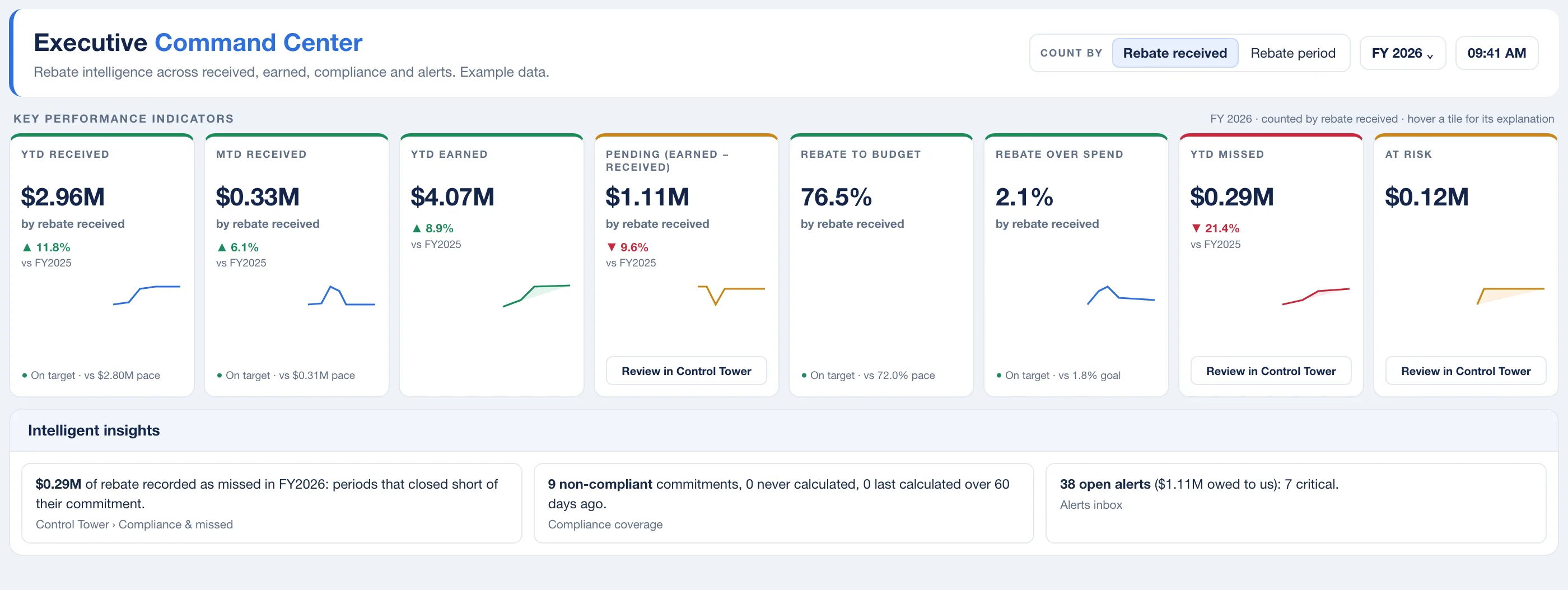
Rebate Recovery
The money your suppliers still owe you, worked out from your own purchases: owed today, on pace this period, and still open before the period closes. Three figures, never added into one.
You see the shortfall before the supplier’s statement arrives
Each period is calculated from your purchases at the tier they actually reached. A payment at a lower tier leaves the difference open on the contract’s page.
Every number shows its work, including every $0
Each result carries a sentence saying what matched, what did not and what would close the gap. A rebate reading zero names the rule that emptied it.
Contracts as they are written, read by AI and approved by a person
Upload the signed agreement and the contract assistant proposes tiers, commitments, caps and payment terms with the evidence for each. How it reads a contract
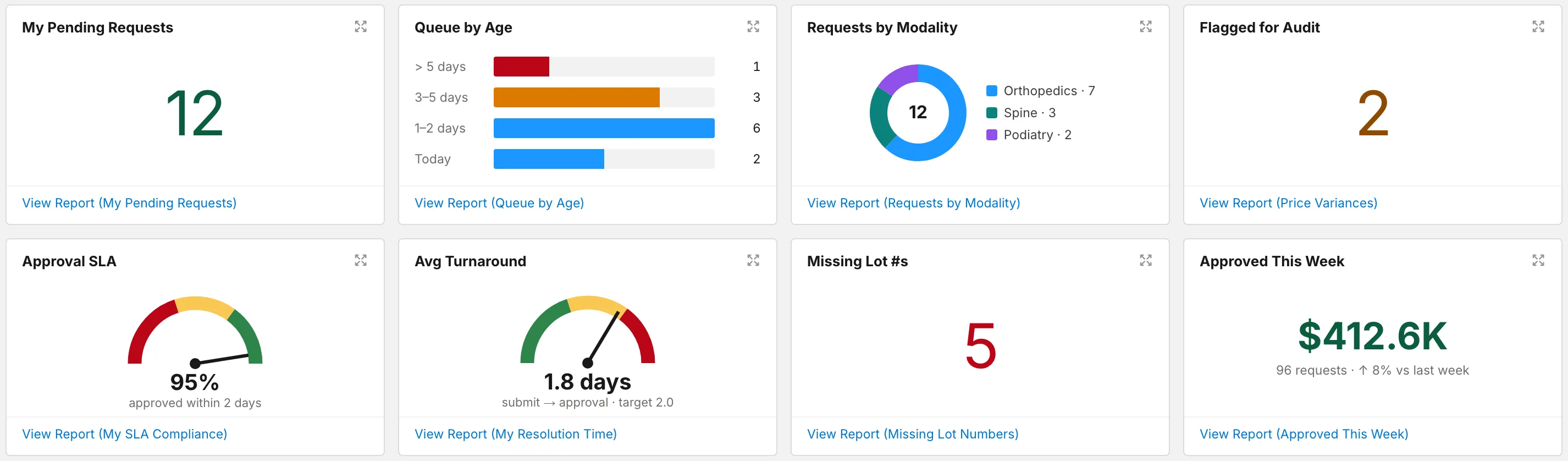
Implant Control
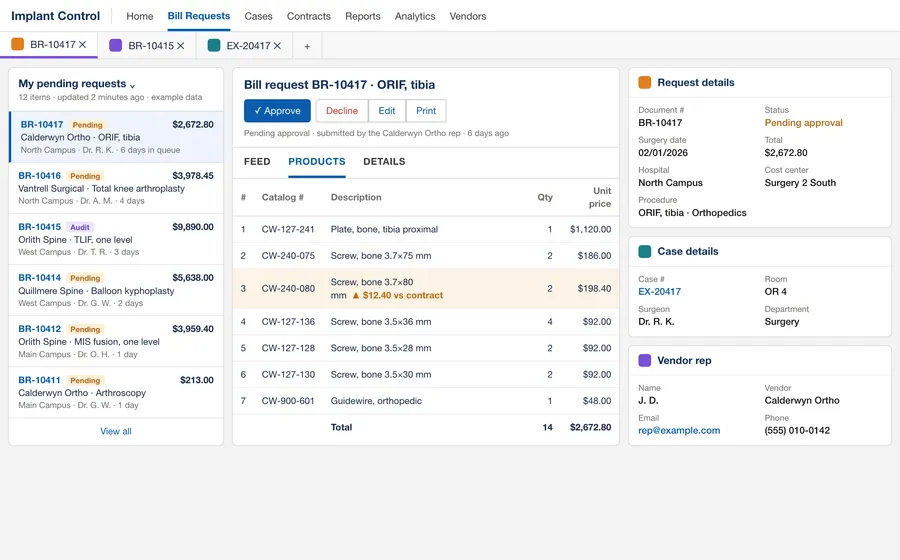
The vendor rep files the bill-only request once, online. Every line is checked against your contract price and the surgical case before a purchase order exists. Your team works only the lines that differ.
The price you negotiated is the price on the request
Lines are picked from your contract price list at your price. Anything off contract is entered separately and flagged before approval, not found in an audit a quarter later.
Did we implant what we were billed for?
Every request is matched to the surgical case on catalog number, quantity and price. Quantity one request has claimed is not available to the next.
Your bill-only policy, enforced on every submission
Late needs a written reason, too late is refused, a duplicate case number is flagged. The software holds the line so reminder emails do not have to.
Watch it work
Three short walkthroughs, each on one job. Every name and figure in them is invented.
- Signed PDFto statement
Rebate Recovery
A contract, from signed PDF to statement
One supplier contract loaded, calculated and read back, then the rebate year on one page. Figures illustrative.
- Why is thisrebate $0?
Rebate Recovery
Why is this rebate $0?
Each rule applied in turn, until the one that empties the rebate is named.
- From the repto the PO
Implant Control
A bill-only request, from the rep to the purchase order
The rep files, the system checks price and case, the approver works one line, the queue clears. Figures illustrative.
Does this happen at your hospital?
Each one is paired with the check or alert in our software that catches it, and a page that explains how.
Mark the ones that happen where you work to see what catches each.
The rep sends a sticker sheet days after the case
Submission rules in Implant Control
The rep files the request online against the real surgery, choosing lines from your contract price list. You decide when a late request needs a written reason and when it is refused outright.
The price on the request is not the contract price
Contract price on every line in Implant Control
Contracted items are picked from your price list at your price, and anything off contract is entered separately and flagged. The approver sees the contract price beside the requested amount on every line, with any difference highlighted.
The same implant is billed on two requests
Case reconciliation in Implant Control
Every request is matched to the surgical case record, and quantity one request has already claimed is not available to the next. A case number already on another open request can be flagged as a duplicate.
Rebates are tracked in a spreadsheet
Contracts held as written in Rebate Recovery
Each agreement is set up once, in a guided wizard or from a draft the contract assistant proposes from the signed PDF, and every term reads itself back in one sentence. The rebate is then recalculated from your purchase files as they load, not retyped.
A compliance form deadline is missed
Compliance form due alert in Rebate Recovery
When a period ends and its form is not recorded as sent, an alert carries the rebate the form protects and grows more urgent as the forfeiture date nears. If the date passes with the form still out, it becomes a forfeiture risk alert.
Nobody checks the tier on the supplier statement
Earned against received, period by period in Rebate Recovery
Each period’s rebate is calculated from your own purchases at the tier they actually reached. Record the supplier’s payment against it, and a payment made at a lower tier leaves the difference open, raised as overdue once the payment date has passed.
A payment is late and nobody is counting
Payment overdue alert in Rebate Recovery
Once a period’s payment date has passed and less has arrived than was earned, the shortfall is raised as an alert on that contract. Record the payment when it lands and the alert closes itself.
How Rebate Recovery catches itHow Implant Control catches it
Rebate Recovery alerts appear inside the product, on each contract’s page, and are not sent by email. Administrators see the portfolio alerts inbox first.
Written up so you can use it, whether or not you ever talk to us
How rebate money goes missing and how bill-only spend escapes contract price, from the people who build the checks.
The other revenue recovery: the rebate money your supply chain already earned
Revenue recovery usually means denied claims. This is the supplier-side version: rebates and credits your purchases earned that never arrived, and how to size the gap yourself.
Why a rebate reads $0 and nothing errors: six silent causes
Six setup causes of a rebate that calculates to $0 with no error, in the order to check them, with worked examples and the two cases where zero is correct.
Bill-only purchase orders, explained: the workflow from surgery to paid invoice
An operating manual for bill-only purchasing: the seven steps, who owns each one, where the two records of a surgery drift apart, and the controls and metrics to run it by.
See what your contracts already owe you
Bring one supplier contract and a purchase extract. In a working session we load it, run the numbers and hand you the statement: earned, received, owed.